As we start 2011 and reflect on 2010, one of the major initiatives for many clients was creating globalized, multilingual sites. The message was especially clear when we spoke to attendees at events like the Enterprise 2.0 conference, KMWorld and J. Boye. In particular, I was surprised at the number of attendees planning or that have implemented “localized” or multilingual SharePoint applications. Unfortunately, as I learned directly, the information available from Microsoft on all multilingual scenarios is uneven.
To their credit, Microsoft has done a relatively good job of making multilingual interfaces within SharePoint available. Microsoft has released 40 language packs for SharePoint. These language packs allow organizations to create sites and site collections in any of the languages supported by the language packs. If your work involves intranet or extranet scenarios (externally facing collaborative sites for trust non-employees), the language packs will serve you well. If you want a French or Arabic collaboration site, just create a new site and stipulate the language. Individual users are free to contribute list items in the site’s language and see localized SharePoint interfaces.
In an effort to provide some small assistance to other folks implementing multilingual sites, here is a quick reference list of sorts that provide details on some of the basic setup.
Variations
Publishing sites (SharePoint sites created using the “Publishing” or “Publishing with Workflow” site definitions) use a concept called “Variations” to enable the presentation of site content in multiple languages. This concept has little to do with language packs and more to do with a basic copy process. When you setup a multilingual publishing site in SharePoint, you designate a root site, a “source variation” site and other “variation language” sites. As you create content in the source language site, a SharePoint timer job copies content (e.g. pages) and site structures (e.g. sub sites) from the source variation site to each of the other variation sites.
The root site is merely the default URL for your web site; when web users navigate to the root URL, they are automatically redirected to the variation site that matches their browsers language setting. As a developer, you can even change the logic used to redirect users to a specific language site by modifying the variations landing page called VariationsRoot.ASPX. In doing so, you can enable SharePoint to handle other redirection processes like redirecting based on a previously selected language preference stored in a cookie or redirecting based on profile data (e.g. you know the user is based in Belgium and prefers French over Dutch).
Finding the Variations Setting and Beginning the Setup
There are two settings that control variations at the site collection level. Both settings are found in Site Settings under Site Collection Administration. To begin the process, you click on the Variations menu option.
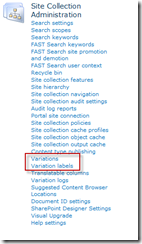
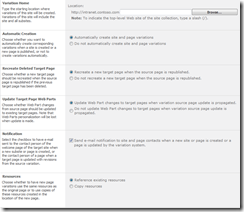
By clicking on Variations you begin setting up how variations will be configured for your site collection. In the subsequent interface, the “Variation Home” is what is called “Root Site” in this post (and what Microsoft typically calls it as well). The variations interface is shown below:
Variation Labels
Once you’ve setup the global variations feature, you need to setup each variation label. Variation labels represent every variation site you want to include in your public web application, including the source site. For example, if you want to have a French (France), German (Germany), English (UK) and Arabic (United Arab Emirates), you’d need a total of four variations. Of those variations, you’d pick one to be your source variation; the rest would receive content created in the source.
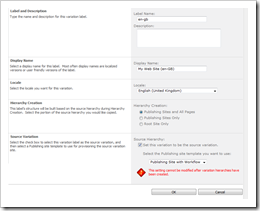
When you create the labels for the first time, you start by creating the source label. In our example, we’ll call our UK English site the source. There are a few fields to complete:
Here’s a screen shot of the form in SharePoint:
Other Language Variants
After you’ve setup your source variant, you setup the other language variants you want to represent. The setup process is similar to setting up the source variation, except that the check box indicating the variation is the “source” will be greyed out and disabled.
Once you’ve completed creating the other variants, click the Create Hierarchies button to begin the creation process. NOTE: Creating the hierarchies is handled by the timer job. As a result, you will either have to wait for the timer job to run or manually initiate the job to see the variations. This is also true of other timer job-dependent activities like site structure and page propagation. More information on timer jobs is provided below.
Timer Jobs
Technically there are multiple timer jobs that each handle a different aspect of the propagation process. Each timer job runs on a different schedule. Here is the list of variation timer jobs and the default interval:
Depending on your needs, you can modify the default interval to match your publishing schedule. For example, if you publish pages frequently, you may want to increase the timing of your page propagation and creation to 30 minutes instead of an hour.
Keep in mind that there’s a version of these timer jobs for every SharePoint application (think URL). This means that you’ll have 3x the number of application configured for variations to manage. Thankfully, Microsoft provides a view of timer jobs per application.
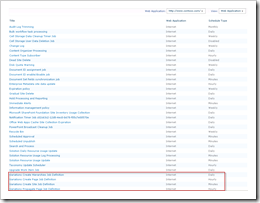
A screen capture of the time job definitions for a sample site is shown below:
Additional Notes
Like much in SharePoint, the choices you make should be based on your specific requirements; there is usually more than one way to satisfy a need and multiple ways to develop a solution. To that end, here are some notes about variations setup to help you make these decisions.
Continue to part 2 of this series
To their credit, Microsoft has done a relatively good job of making multilingual interfaces within SharePoint available. Microsoft has released 40 language packs for SharePoint. These language packs allow organizations to create sites and site collections in any of the languages supported by the language packs. If your work involves intranet or extranet scenarios (externally facing collaborative sites for trust non-employees), the language packs will serve you well. If you want a French or Arabic collaboration site, just create a new site and stipulate the language. Individual users are free to contribute list items in the site’s language and see localized SharePoint interfaces.
NOTE: Tony Byrne, Founder of the Real Story Group, pointed out recently that one of the advantages of using software from larger software companies like Microsoft, Oracle and IBM is that there will be far broader and better tested multilingual support. Many smaller vendors either don’t provide multilingual support at all or provide a far smaller set of supported languages. Both issues could be particularly problematic for SharePoint deployments as many rely on 3rd party add-ons from smaller vendors. You should do your homework on potential solutions to ensure they support the languages you will deploy.
Where documentation for multilingual sites falls short is in the internet scenarios – specifically creating multilingual “publishing” sites (think about the typical corporate web site). There is some limited content in blogs, technet and MSDN. However, this content either discusses language packs and variations abstractly or, in the case of most blog content, applies to SharePoint 2007. All of it falls short of the quick reference needed by many organizations deploying publishing SharePoint sites. In an effort to provide some small assistance to other folks implementing multilingual sites, here is a quick reference list of sorts that provide details on some of the basic setup.
Variations
Publishing sites (SharePoint sites created using the “Publishing” or “Publishing with Workflow” site definitions) use a concept called “Variations” to enable the presentation of site content in multiple languages. This concept has little to do with language packs and more to do with a basic copy process. When you setup a multilingual publishing site in SharePoint, you designate a root site, a “source variation” site and other “variation language” sites. As you create content in the source language site, a SharePoint timer job copies content (e.g. pages) and site structures (e.g. sub sites) from the source variation site to each of the other variation sites.
The root site is merely the default URL for your web site; when web users navigate to the root URL, they are automatically redirected to the variation site that matches their browsers language setting. As a developer, you can even change the logic used to redirect users to a specific language site by modifying the variations landing page called VariationsRoot.ASPX. In doing so, you can enable SharePoint to handle other redirection processes like redirecting based on a previously selected language preference stored in a cookie or redirecting based on profile data (e.g. you know the user is based in Belgium and prefers French over Dutch).
Finding the Variations Setting and Beginning the Setup
There are two settings that control variations at the site collection level. Both settings are found in Site Settings under Site Collection Administration. To begin the process, you click on the Variations menu option.

By clicking on Variations you begin setting up how variations will be configured for your site collection. In the subsequent interface, the “Variation Home” is what is called “Root Site” in this post (and what Microsoft typically calls it as well). The variations interface is shown below:

Variation Labels
Once you’ve setup the global variations feature, you need to setup each variation label. Variation labels represent every variation site you want to include in your public web application, including the source site. For example, if you want to have a French (France), German (Germany), English (UK) and Arabic (United Arab Emirates), you’d need a total of four variations. Of those variations, you’d pick one to be your source variation; the rest would receive content created in the source.
When you create the labels for the first time, you start by creating the source label. In our example, we’ll call our UK English site the source. There are a few fields to complete:
| Field Name | Description | Example Value |
|---|---|---|
| Label and Description | This is essentially the portion of the URL that designates the site. If your web site URL was http://www.mywebsite.com/ the label portion would be inserted after the last slash like http://www.mywebsite.com/[variation label]. In most cases, the label is going to be the two-letter ISO code for the language, followed by the two-letter ISO code for the country. Wikipedia has a complete list of the current ISO language codes and ISO country codes. | en-gb |
| Display Name | This field is what will be used to not only describe the variation in the management interface, but it will also be the default name of the site when the variation site is created. Typically the display name is the localized title of your web application. If your web site was called “My Web Site” in English, you would enter that value for our UK English site. For French, you might enter a display name like “Mon site Web” | My Web Site |
| Locale | Use this setting to specify the language represented by a specific variation. There are numerous languages show in the drop down and potentially multiple versions of any given language (e.g. Spanish in Spain vs. Mexican Spanish). You should choose the appropriate language that fits your needs. This setting is used by SharePoint to match a user’s browser language setting to the appropriate variation. | English (United Kingdom) |
| Hierarchy Creation | This setting determines what portions of the source variation SharePoint will replicate to other variation sites. | Publishing Sites and All Pages |
| Source Variation | This sets whether the variation you’re currently defining is the source variation. This setting is something that is set once on a specific variation and can’t be changed after you’ve created the hierarchy. This option also sets the specific site definition used in creating all variations. NOTE: only publishing site definitions (e.g. Publishing Site) are there by default. | Publishing Site with Workflow |
Here’s a screen shot of the form in SharePoint:

Other Language Variants
After you’ve setup your source variant, you setup the other language variants you want to represent. The setup process is similar to setting up the source variation, except that the check box indicating the variation is the “source” will be greyed out and disabled.
Once you’ve completed creating the other variants, click the Create Hierarchies button to begin the creation process. NOTE: Creating the hierarchies is handled by the timer job. As a result, you will either have to wait for the timer job to run or manually initiate the job to see the variations. This is also true of other timer job-dependent activities like site structure and page propagation. More information on timer jobs is provided below.
Timer Jobs
Technically there are multiple timer jobs that each handle a different aspect of the propagation process. Each timer job runs on a different schedule. Here is the list of variation timer jobs and the default interval:
| Timer Job | Description | Default Execution Interval |
|---|---|---|
| Variations Create Hierarchies | This job creates the hierarchies defined in the variation labels section of the variations settings. As you add new labels, this job takes care of creating the corresponding variation site | Every 24 hours |
| Variations Create Site | This job creates variation sites if the automatic creation setting is disabled in the Variations section of the site collection settings. | Every 5 minutes |
| Variations Propagate Site | This job creates variation sites if the automatic creation setting is enabled in the Variations section of the site collection settings. | Every 5 minutes |
| Variations Create Page | This job creates new pages in each of the variation sites once the page has been created in the source site. | Hourly |
| Variations Propagate Page | This job updates existing pages in the variation sites once an update has been made to a source page. | Hourly |
Depending on your needs, you can modify the default interval to match your publishing schedule. For example, if you publish pages frequently, you may want to increase the timing of your page propagation and creation to 30 minutes instead of an hour.
Keep in mind that there’s a version of these timer jobs for every SharePoint application (think URL). This means that you’ll have 3x the number of application configured for variations to manage. Thankfully, Microsoft provides a view of timer jobs per application.
A screen capture of the time job definitions for a sample site is shown below:

Additional Notes
Like much in SharePoint, the choices you make should be based on your specific requirements; there is usually more than one way to satisfy a need and multiple ways to develop a solution. To that end, here are some notes about variations setup to help you make these decisions.
- Variations can be used for more than just language versions of content. Microsoft documentation points out that the logic to redirect users to specific variations could be used just as effectively to redirect a client to a mobile device. In this case your label could simply be “M” for a mobile version of your site.
- The timer jobs do not replicate other lists or libraries from one variation to another. This means that you must create lists and libraries in each variation manually after the hierarchy is setup. This is also true of content in those lists and libraries; the timer jobs focus on structure (e.g. sites and sub sites) and pages. However, if secondary lists are important for your solution, consider creating a custom timer job.
- Variations are site collection bound. This means that all variation sites are housed in the same site collection. If, for some reason, you think you may need more than one site collection, you’ll have to recreate your variation setup for each site collection. Each site collection would be managed independently.
- When possible, use features and feature stapling to modify the nature of any particular variation (if necessary). For example, if you need a specific SharePoint list or library created in each variation, use a feature and staple it to each variation as it’s created to ensure the list exists.
- Content contribution is a bit trickier with variations, since each variation is essentially it’s own “web site.” As such, you will need to spend more time training content contributors and more time supporting them.
- If you use the new managed metadata feature in SharePoint, you’ll need to provide translations for terms as well. Since all variations are housed in a single site collection, you can even use managed metadata bound to a column vs. enterprise managed metadata to isolate terms that may be specific to your site.
- You are required to setup a root SharePoint site for the site collection. However, once variations are setup, no one will likely see the root site (since the VariationsRoot.aspx page will be set to the home page of that site). As such, you don’t have to do much with it. However, you could use the site to store more global resources, like images and documents, for use across all variations.
- Especially during development, you should execute the timer jobs manually by going to Central Administration, go to the Monitoring section and click on Timer Job Definitions to find the right job. When you click on a specific timer job, you’ll have the opportunity to run the job manually. Manually running the timer jobs will allow you to see what’s actually happening within your sites without having to wait for the job to run automatically.
Continue to part 2 of this series
