Yes and no. You see, its just not as easy as a black and white response. You could argue that SharePoint needs an app store because there are far too many specific use cases for which it’s out of the box experience is ill suited. However, SharePoint does ship with a number of “apps” (Microsoft calls them “Site Definitions”) that can satisfy relatively simple needs with little or no work. The challenge is whether the out of the box archetypes like “team sites” or “document workspaces” in Foundation or “publishing portal” or “search center” in the Standard/Enterprise versions are sufficient; could Microsoft or a 3rd party effectively create additional, purpose-built archetypes to improve end user adoption and overall usage?
To illustrate this point, let’s suppose you need to create a web-based collaboration space to work on a document with a small team of people inside your company. It’s actually quite simple to use what SharePoint provides immediately. You’d likely start with a “document workspace” (shown in Figure 1). The workspace can be provisioned while you’re reviewing the document from within Microsoft Word (or another Office product) or from SharePoint’s web-based interface. You can even invite your colleagues from the same interface (within Word) or, again, through the web interface, without any trouble. Once the workspace is provisioned, you’d automatically have a library to store the document (and the document would already be waiting there for you and your team members). In addition, the workspace would show who was participating in the workspace through the members list (with direct links to their individual profile by clicking on their names), a task list to assign & track responsibilities, an announcements function to communicate with your team and a discussion thread for working exploring topics relevant to the document. All of these features are packaged up and provisioned automatically. So what’s the problem?
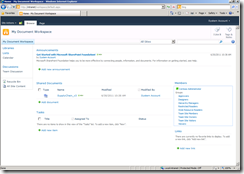
Figure 1 – Typical Document Workspace in SharePoint 2010
What happens when you want to create a quick, web-based file sharing site and “invite” others inside or outside of your organization? You’ll quickly find the standard SharePoint site definitions fall a bit short. SharePoint does have features that support file sharing through sites and libraries; users could even access and edit those files through Office on your desktop or use Office web app through a browser. There’s also the possibility to let non-employees access the site. Unfortunately, the collection of features, along with the requisite security model are not available in a shipped SharePoint site definition. As a result, an end user would have to start with an existing site definition, like a “blank site,” then add a combination of lists and libraries to create the environment they want. Next, they would grant internal participants access to the site, applying library/list-specific or document-level permissions as necessary. If the users aren’t in Active Directory (like the non-employees), SharePoint allows you to use SQL Membership to store those non-employee IDs in a SQL database. However,the non-AD authentication configuration work requires you to manipulate machine-level settings in an XML configuration file, create databases on a SQL server and grant specific application pool identities access to the database. Most of this effort is typically outside the expertise of an average end user; even if they weren’t, because of the changes necessary to the farm, most administrators wouldn’t want end users changing these settings.
Ultimately, there’s little evidence that SharePoint is wholly unsuited for collaboration needs inside the enterprise. If fact, you could argue that SharePoint, given its breadth of functionality, has no equal in the collaboration space. However, there are well-documented challenges in creating you own applications on SharePoint. Remember that SharePoint, by Microsoft’s own admission, is a platform and not a product. This means companies are either left developing their own applications or buying from a 3rd party. This begs the question: should Microsoft devote some of their R&D budget to developing applications on top of SharePoint? Further, wouldn’t building applications on SharePoint, in fact, be more useful to a greater number of people than adding new features to the platform? This approach would certainly go a long way to blunt attempts by companies like Huddle, 37 Signals, Box.NET, HyperOffice and others to discredit SharePoint for purpose-build solutions. Microsoft has demonstrated, historically, their willingness to drive down this path with new site definitions like the “Fab 40.” Unfortunately, some of these applications were just silly (like the Baseball Team management portal) and they never followed-up with equivalents on SharePoint 2010.
If you’re searching for specific applications on SharePoint today, you’ll need to look to the myriad of 3rd party vendors like Bamboo Solutions, Coras Works, SharePoint Solutions or the app store concept from the larger SharePoint community called Sharevolution. Unlike Apple and Google (or even Microsoft’s own online store for everything from Windows to XBox to non-Microsoft hardware), Microsoft has not created that one-stop-shop to find specific solutions built on SharePoint. One can only hope that, in the future, Microsoft does something more creative than simply redirecting the domain sharepointapps.com back to the SharePoint product site on Microsoft.com.

