27 July 2008

SharePoint and Coffee ... Perfect Together

It's not clear what implication the following recommendation from Amazon may have, but I suspect that Rob Bogue et. al. will be thrilled with the additional promotion. 

image

In fact, the recommendation is a split -- promotion of products based on what I just ordered (K-Cups for my new coffee maker) and products that fit my purchasing habits over the last few months.  However, the presentation of the two recommendations together made for a remarkable checkout process.

24 July 2008

Take control of SharePoint Security

One challenge for companies implementing SharePoint is to figure out security. Keeping the model straight over time, as the SharePoint implementation matures, is even more of a challenge. SharePoint's ease of installation and high-level configuration can sometimes mask its underlying complexity, especially when dealing with more advanced scenarios like security.

Click here for the rest of the article on SearchWinIt.COM

16 July 2008

Integrating existing applications with SharePoint Server 2007

It's likely that you are using Microsoft Office SharePoint Server 2007 in your organization. If not, there's probably a strong contingent within your organization lobbying to implement the technology.

Once you have SharePoint server, though, there's the inevitable challenge of integrating existing applications into the portal framework. So, this begs the question -- if you want to use SharePoint as your enterprise portal platform, how do you integrate applications that aren't "SharePoint-aware?"


Read the rest of the my new article on SearchWinIT.COM

03 July 2008

SharePoint and Oracle Internet Directory (LDAP)

[UPDATE 6 SEPT 2010] The code has been posted on a new article about connecting SharePoint to Oracle LDAP

I have a client who recently wanted to leverage their Oracle Internet Directory server to authenticate users in SharePoint.  Since OID is LDAP compliant, I figured I could just use the generic LDAP provider with SharePoint.  Turns out, that provider is only supplied with MOSS and my client was using WSS.  So, off to Visual Studio to create a custom membership provider I went. 

I've seen a number of posts regarding the creation of custom membership providers for non-Microsoft directory sources like SunOne and OID.  However, I never saw any code samples (most folks didn't seem to be able to get it to work).  While other posts on custom membership providers tended to rehash the same material on SQL Membership.  As it turns out, it's pretty straight forward, as long as you have all of the right connection information (and understand the schema of the directory).  I would be happy to post the code if anyone is interested.  Short of that, here are some of the discoveries I've made:

  1. You can use the standard System.DirectoryServices.Protocols.LdapConnection class to connect to OID.  Here's the generic code I used:

    LdapDirectoryIdentifier _identifier = new LdapDirectoryIdentifier(ldapServerName, portNumber);
    connection = new System.DirectoryServices.Protocols.LdapConnection(_identifier);

  2. You need to override the Initialize member of the base membership class to supply the various connection settings you'll need.  There's a NameValue collection that's passed to this member built from the properties on the provider information you have to supply in Web.Config.  In my case, I limited my settings to LDAP server address (name or IP address), the LDAP port (originally my client suggested they used a non-standard port), Application Name (a property you must override when developing a custom membership provider) and LDAP domain (e.g. dc=com,  dc=customer).   The MOSS supplied provider is a bit more flexible, but I didn't particularly need all of that flexibility (read "complexity").
  3. I had to add the same provider information to Central Administration as I did for my SharePoint site.  I didn't change the authentication method on Central Admin, but without adding the provider, I could not get the people picker (in my SharePoint site) to resolve the user IDs from OID.  Once I added the provider all worked well.  In fact, in some cases, it seems that Central Admin "knows" about the user before the SharePoint application.
  4. You have to overload the following members in the base membership provider in order for it to work with SharePoint
    1. ValidateUser (the member that actually ensures the user is who they say they are)
    2. GetUser (both versions)
    3. GetUserNameByEMail
    4. FindUsersByName
    5. GetAllUsers

      An article published on MSDN defines the minimum interfaces: http://msdn.microsoft.com/en-us/library/bb975135.aspx#MOSSFBAPart2_DevelopingCustom
  5. You don't necessarily have to authenticate with the directory to exercise most of the members above, with the exception of ValidateUser.  In my case, my client's OID implementation enabled anonymous access.
  6. The act of "binding" to the LDAP directory validated the user.  That said, this only worked for users in the directory.  If I passed a user that did exist, but provided the wrong password, the validation failed as expected.  If, however, I passed a non-existent user to the directory (regardless of the combination of user ID and password), the Bind() method did not return any errors and my "authentication" worked.    I'm not sure if I've missed something or if this is unique to LDAP, but it was a strange behavior.  During my development I used a tool called LDAP Admin (http://ldapadmin.sourceforge.net/).  The tool was invaluable for validating connection information and user data.  It also, however, suffered the same fate as my code -if I tried to authenticate a user that didn't exist, the connection would be successful.  Weird.
  7. My client also wanted to use a single sign-on service provided by OID.  The service is quite flexible, supporting three different methods for supplying credentials to target applications - GET, POST and BASIC..  Unfortunately, since we configured the site with a custom membership provider, the only options were either GET or POST.  We chose post.  Unfortunately, the standard login page doesn't seem to want to allow a post from another page (although I didn't spend a long time to work it out).  I ended up constructing a basic page that took in form properties and then used the Membership class to authenticate the user and redirect them back to the SharePoint site.

Ultimately, the new provider works well and the SharePoint site is integrated with the SSO server.  User's who have access to my client's Oracle Portal can seamlessly access their SharePoint site as well  -- all without having to authenticate a second time.  And, because both web sites use the same LDAP, there's not need to synchronize user IDs and passwords.

Again, if you're interested in the code, just drop me a line; if I get enough requests, I'll post the code directly.

[UPDATE 6 SEPT 2010] The code has been posted on a new article about connecting SharePoint to Oracle LDAP

28 June 2008

REVIEW: Carbonite Online Backup

One of the challenges of constantly traveling is ensuring that all of my data is continuously backed up.  Having lost data as a result of either a hardware or software failure, I know I need a backup, but I could never find a good solution. Enter Carbonite.

I happened upon Carbonite about four months ago.  Essentially, they offer an online backup of your machine (Windows only).  For $49/year, they will allow you to backup an unlimited amount of data.  When you sign-up for the service, they require a small agent download and install.  The agent constantly monitors various folders/files on your machine to determine whether they've changed; if they have, it starts copying the file to your online backup.  By default, Carbonite will backup all of your personal files -- on XP, this means anything in your Documents and Settings directory.  In Vista, this would include anything in your Users directory.  If you want to add other directories/files, just right click on the file or directory and pick Carbonite from the context menu and then "Back this up."  With virtually the same operation, you can also exclude certain files.

image

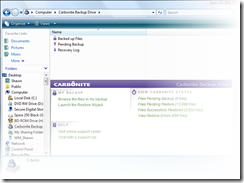
In addition, Carbonite surfaces in your "My Computer" as another drive.  Double clicking on the icon will show you what's been backed up.  It's presented as an Explorer-like interface, making finding a file pretty easy.
image

In my own experience, I ended up backing up about 32 Gb of data.  The complete backup took a number of days to complete.  However, Carbonite indicates a particular file's backup status by placing a small "button" on each file -- if the button is yellow, the file is in need of backing up.  If the button is green, the current version of that file is backed up.  You can also look at the Carbonite agent status in your system tray -- green indicates all files are backed up and yellow indicates that certain files require backup.

While backup is one thing, the restoration is entirely a different matter.  I also recently had the opportunity to test the service.  Not being completely trusting, I backed my files to a USB drive prior to wiping out my machine.  I then reloaded by then XP laptop with Vista, reloaded the Carbonite agent and told the agent to start a restore. 

Within a day I had most of my important files back.  That said, it's been about a week since I started the restoration and Carbonite still reports that I have quite a few files left to restore.  In truth, I'm not precisely sure what is missing, but I suspect it's my extensive (legal) music collection, since all of my documents have been restored.  Looking at the restore status in Carbonite has largely confirmed my theory.

My Observations:

  • While backups certainly can happen over a longer period of time, waiting a week (or more) to get all of your files restored is unreasonable.  Granted, I've not been connected to a high-speed connection the entire time.  However, I have had 1 Mb or better connectivity for the better part of four days during week.  I'm not sure if the slowness is simply a function of available bandwidth or how Carbonite prioritizes its use of your bandwidth; throttling bandwidth usage for normal backups is expected, but I would think it would want to consume as much bandwidth as possible for the restoration.
  • I've recently started using the service on a server.  I'm not backing up a ton of data, but the fact that the files are "instantly" offsite is somewhat comforting.  Because there isn't a lot of data AND the server will have a dedicated connection with loads of bandwidth, my guess is that any restore should be pretty snappy.
  • I have tried contacting support regarding my restore speed.  It's been two days and so far I've not heard back.  Their web site did state that they were dealing with "higher-than-normal" volume.  Not sure what that means for them, but I'm growing a bit impatient.

My Verdict:

  • For basic backups of your files, I've been pretty happy with the service.  For $49/year, you can't beat the price, especially since you're allowed unlimited space.
  • Now knowing restores take so long, you may consider just using Carbonite for selected files.  If you have  high-speed connection, the restore should be O.K.  My bread and butter files were restored pretty quick (desktop and documents).

If this service sounds interesting to you, check out Carbonite's web site.  (NOTE: the link is a "refer a friend link")

26 June 2008

Issues with Virtual PC 2007 and Vista

I recently upgraded my primary laptop to Vista Ultimate.  Reluctantly I gave up the security of Windows XP and the comforts of a long-lived laptop build -- not that XP was my dream OS, but I had gotten used to its quirks and I knew what to expect.  That said, it was getting long in the tooth and Vista did have a certain allure.

After the upgrade (actually a reformat and a clean install), I installed Virtual PC 2007 SP1.  When I tried to start my primary development machine, I got the following error:  "The virtual machine [VPC NAME] can't be started because it is being used by another program, or marked as read-only...."  Once my mild stoke abated, I did what every good developer does... I Googled the error and found the following articles describing other experiences with the same (or similar issue):

The trouble was that all of these articles focused on security changes in Vista: either the current user (me) doesn't have access to the files or 2) for whatever reason, VPC needed to run with elevated permissions (as an Administrator).  As it turns out, I did have to adjust permissions on the files.  There were some remnants of permissions left over from my XP machine.  Unfortunately, resetting the permissions didn't fix the problem. 

In looking through various settings, I noticed a curious attribute setting - the "read only" flag appeared to be set.  Unfortuately, unchecking the read-only flag on the folder where my virtual machine was stored seemed to have no effect.  Every time I clicked O.K., closed the properties page and reopened to check the setting, I was presented with exactly the same situation -- the read only flag appeared to be set.  This lead to another Google search and another wild goose chase, that allowed me to learn the read only attribute mysteriously getting set is something that a good many other folks are struggling with when using Vista.  And, in fact, I learned that the read only attribute is only settable at the file level, not at the folder level.  You can click on the check box next to read only flag all day long and nothing will happen to the folder -- it will, however, set the flag on the underlying files.   That said, the read only flag on the individual files was unchecked in my case.

To cut the chase, I had to drop to a command prompt and use the ATTRIB command (DOS old school).  I ran the following:

ATTRIB -R G:\*.* /S 

In this case, G: is the USB drive where my virtual machine is stored.  Once I ran this command, my virtual machine started right up.  Best part... it only took five hours, lots of Google searches and a VERY frustrating, non-productive call to Microsoft support (grist for another post).

From this experience I learned a few things:

  1. MSDN incidents cannot be used 24 hours a day, 7 days a week as the web site suggests (http://msdn.microsoft.com/en-us/subscriptions/bb266240.aspx).  In fact, even though development is my business and not being able to write code, for me, is by definition "being down,"  Microsoft wanted to charge me $500 to open a "critical business" incident (apparently my MSDN incident can't be used for "production" problems...curious).  If I didn't want to go that route, I had to wait until tomorrow to speak with Virtual PC support.  Why?  Apparently after being transferred to various groups no less than five times, having the CSR tell me "my machine is updating and I can't generate a case number for you" and then being hung up on, the last CSR said I missed Virtual PC support by 7 minutes -- she couldn't transfer because I'd be rerouted back to the level one CSRs.  So much for support.
  2. Google is awesome for finding answers to problems -- assuming you know what to search for.  Having done this a few times, I evening got anecdotal solutions that lead to a fix.
  3. Vista is generally a good operating system -- admittedly my experience beyond this problem -- has been positive.  However, these "minor" security changes seemed to have caused great consternation.

Hopefully this post will prevent others from suffering my fate.

18 May 2008

IIR Enterprise-3 Conference

This week I get the opportunity to attend and speak at the Enterprise-3 conference, hosted by International Institute of Research and BI Research.  I'll be chairing a series of pre-conference seminars on SharePoint with Microsoft MVP Bob Mixon.  In addition, I'm presenting a session on "Sorting out the Productivity Suite Mess," which looks at the major competitors of Microsoft Office as alternatives to the market leading productivity suite.

If you're interested in broader collaboration and content management topics, check out CMS Watch Founder and fellow analyst Tony Byrne's talk "Enterprise 2.0 Technology: A Critical Evaluation."  Tony always has terrific insight into the collaboration, portal and content management space.  In addition, there will be a host of other industry leading speakers there to lend their insight into the space.

For those of you attending the conference, I look forward to meeting you there!  If you won't have the opportunity to attend, please send me an e-mail or give me a ring; I'd be happy to share what I learned as an attendee as well as sharing my presentations.